As a student applying to UCDC, you will quickly become familiar with My.UCDC.com. My.UCDC is more than just an application portal. It will also be your primary source of information between your acceptance and arrival to UCDC.
Below are some common questions and answers we typically hear from students about My.UCDC. If you cannot find answers to your questions here, below those, you will find contact and support details.
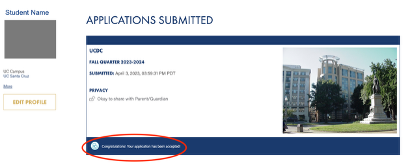
If when you login to My.UCDC you do not see the Housing Contract or "To Do List" on the left hand column, it is likely that you have found yourself on the submitted Applications page of your profile.
To get to the Housing Contract, To Do List, or access additional Internship and Housing Information menus, you simply need to click on the link under the section of your applications that reads:
"Congratulations! Your Application has been accepted!"
or
"Your application has been nominated by your campus"
or
"You have been conditionally accepted into the UCDC program"
Login-> click on application link (if prompted)-> in left column, click “housing contract” -> read and review carefully, then digitally sign at the bottom of the page -> click save
STEP ONE: Sign-In
Navigate to my.ucdc.edu and login using the email and password set during the application process.
STEP TWO: If prompted, click on “Congratulations! Your application has been accepted!”
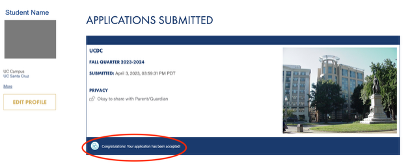
In some cases, this may read “Your application has been nominated by your campus”. Click here instead.
STEP THREE: Choose Housing Contract in the left-hand menu.
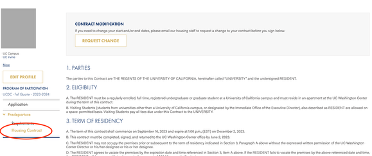
STEP FOUR: Read, Review, and sign.
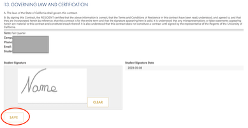
After you sign, click “save”.
How do I Submit a Modification Request
If there is a need to change the dates of the housing contract after signing it, log in to the UCDC StarRez Student Housing Portal and submit a request through the Contract Modification Request form in the menu bar.
NOTE: Student cannot make modifications to the initial contract. Only after you sign the original dates and have your StarRez account created, can you make modifications.
Accept Contract Modifications
If your contract modification request is accepted, your contract will be updated. In order to accept the modified contact, you must re-sign it in my.UCDC. Follow the steps in the FAQ about how to Sign the Housing Contract.